
Outseta offers a number of different form types, including:
- Sign up embed forms—If users need to sign up or checkout for a product on your site, you'll use a sign-up embed form. These forms create a subscription and Account in Outseta.
- Email list forms—Email list forms subscribe people to an email list in Outseta.
- Lead capture forms—Lead capture forms are a flexible way of building custom forms, which create People records and/or Deals in Outseta when submitted.
This article focuses on adding lead capture forms to your website.
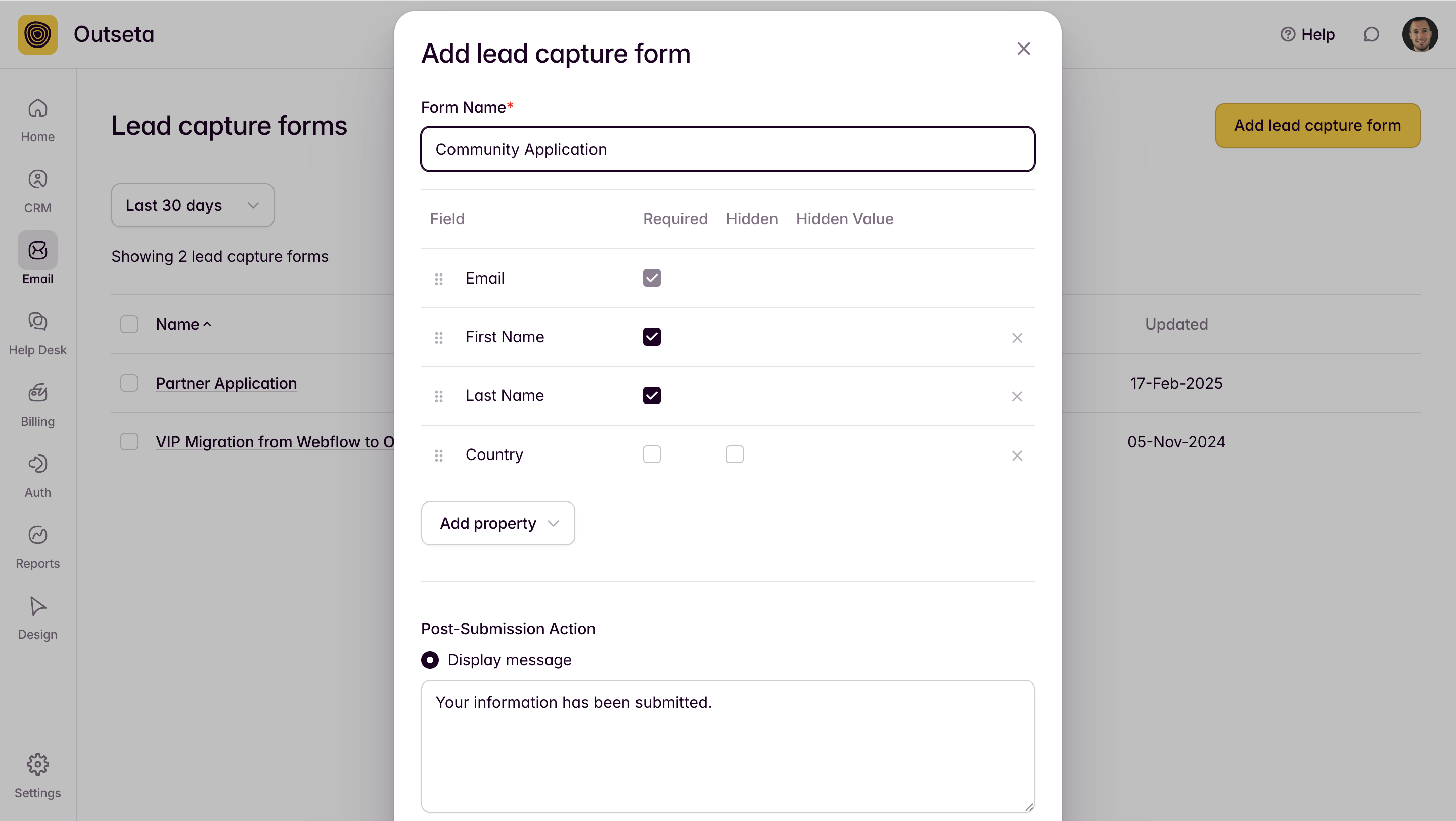
- Click EMAIL > LEAD CAPTURE FORMS. Click ADD LEAD CAPTURE FORM.
- Enter a form name and then add the properties that you'd like to capture on your form.
The properties that you can select from on the drop down menu are the custom properties that have been setup for your People records. If you want to add a field to your form that's not available from the drop down menu, you'll need to first add the field as a custom property on your "People" records.
- Use the check boxes to indicate which fields are required.
- Setup a post submission action. You can either choose to display a pop-up message or redirect users to a specific URL when the form is submitted successfully.
- You also have the option to create a Deal and assign it to a specific stage in your sales pipeline.
When your form is configured to your liking, click SAVE.
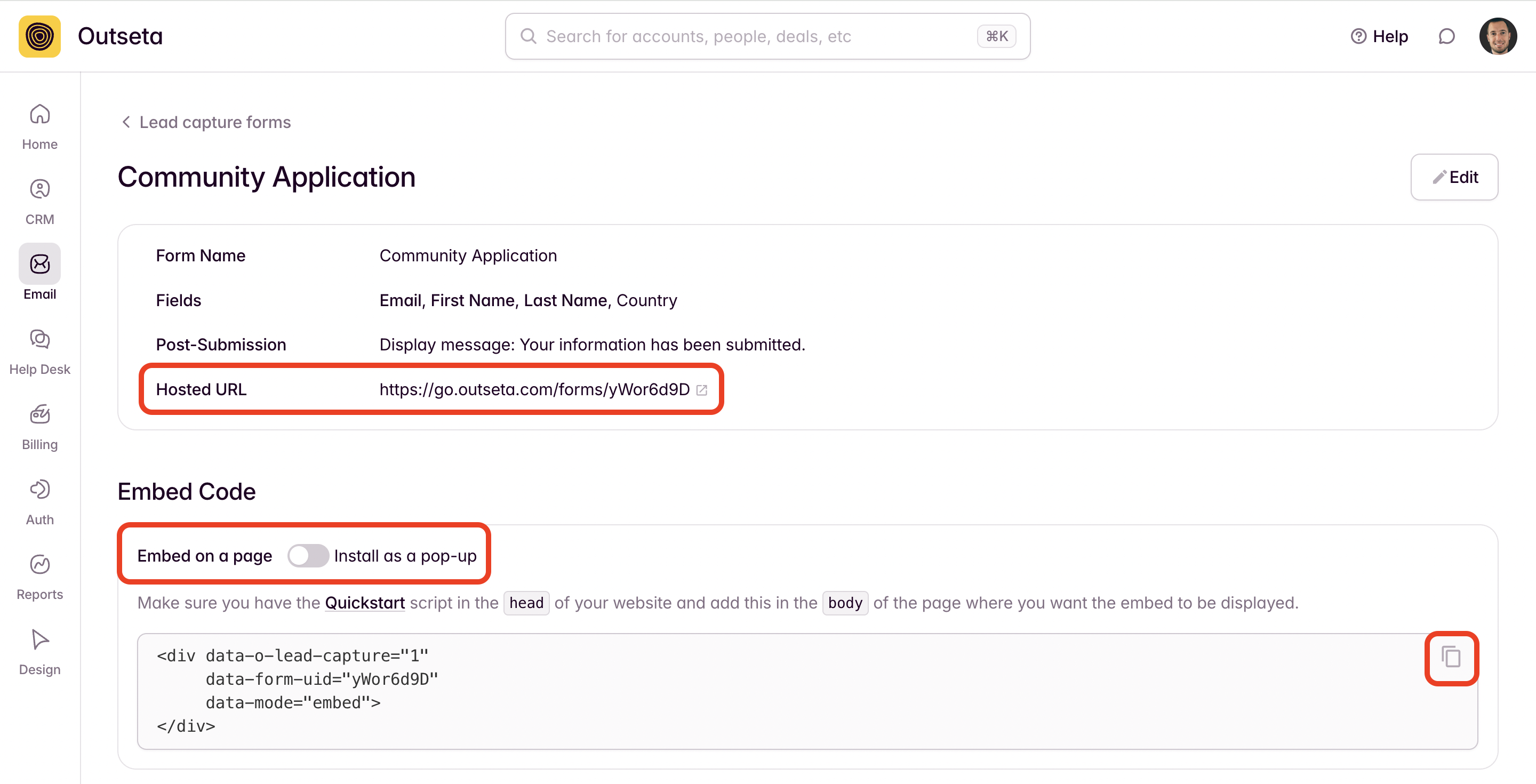
- On the subsequent screen, you're given a few different methods of integrating your lead capture form:
- Hosted URL—This option offers a landing page where you can direct users to complete your form.
- Embed on a page—This option generates a code snippet that you can embed directly on your page.
- Install as a pop-up—This option allows you to open your lead capture form as a pop-up. In this instance there is both a code snippet that gets added to the header of your page, as well as a URL that can be used to trigger your pop-up.
In the example below, I've copied the Embed on a page code snippet. Copy this code into a code or HTML block on your website to add the form to your site. Embedded forms may not render on your site until you PUBLISH your site.
⚠️ Using a custom configuration? If you're using a custom o_options configuration (rather than the default Quick Start embed), you must include leadCapture in your load parameter for lead capture forms to work. See Troubleshooting below if your form isn't displaying.
Regardless of which option you choose to use, the form will automatically create a new People record in Outseta when submitted.
Troubleshooting
Lead capture form not displaying or opening
If your lead capture form isn't appearing (embedded) or opening (pop-up), the most common cause is a missing leadCapture module in your Outseta configuration.
When using a custom o_options configuration, you must explicitly include leadCapture in your load parameter. Here's an example of a configuration that's missing the required module:
var o_options = {
  domain: "your-domain.outseta.com",
  load: "nocode,auth,support,profile", // ❌ Missing leadCapture
  // ... other options
};
To fix this, add leadCapture to your load parameter:
var o_options = {
  domain: "your-domain.outseta.com",
  load: "nocode,auth,support,profile,leadCapture", // ✅ leadCapture added
  // ... other options
};
For more details on configuring the Outseta script, see the JavaScript configuration guide.
Other common issues
- Ensure you've published your site after adding the embed code
- Check that the embed code is placed inside a code or HTML block (not a regular text block)
- Verify there are no JavaScript errors in your browser's developer console