
Outseta handles users, authentication, and billing. But your app likely has its own data too—feedback, comments, projects, documents, or whatever your product handles. This guide explains how to connect Outseta to your backend.
The recommended approach: Reference, don't duplicate
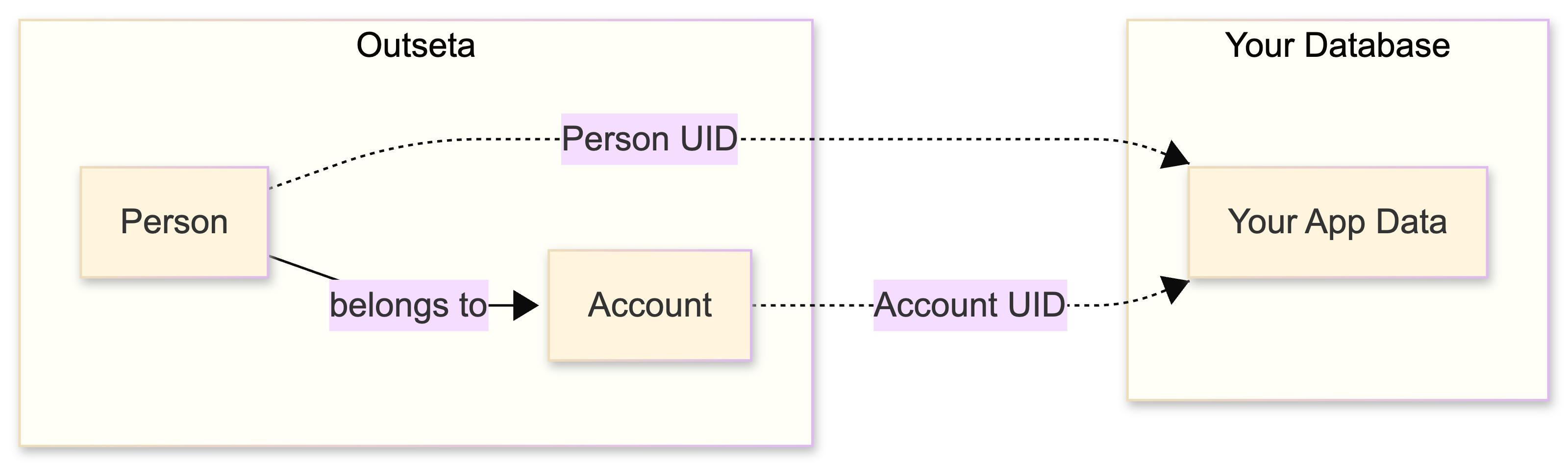
The most straightforward and most maintainable approach is to store Outseta UIDs as foreign keys in your database, rather than duplicating user data.
- Outseta remains the source of truth for user data (names, emails, subscriptions)
- Your database stores only app-specific data (feedback, posts, documents, etc.)
- UIDs connect the two systems
This avoids synchronization challenges and data inconsistencies that come with duplicating user information across systems.
Understanding the Outseta data model
Before designing your integration, understand how Outseta structures user data:

- Person — An individual with a unique email. Can exist without an Account (e.g., email list subscribers).
- Account — An organization or team. Has a Subscription and can have multiple People.
- Subscription — A billing relationship tied to an Account.
A Person can belong to multiple Accounts, and an Account can have multiple People. When a user registers with a subscription, all three are created together.
Connecting Outseta to your database
Your database stores app-specific data and references Outseta via UIDs:
Which UID should you store?
When storing app data, you need to decide whether to link to the Person UID, Account UID, or both.
| Link to... | When... | Example |
|---|---|---|
| Person UID only | Actions belong to individuals regardless of account | Personal preferences, individual activity history |
| Account UID only | Resources are shared by everyone in the account | Team projects, shared documents, subscription features |
| Both Person + Account | Context matters per person per account | Role/permissions, per-account settings, audit logs |
When you need both UIDs
Some scenarios require tracking both who did something and in which account context:
- Per-account preferences — Jane wants dark mode in her personal account but light mode in her work account
- Role-based permissions — Jane is admin in Account A but viewer in Account B
- Audit trails — "Who did this and in which account?" for compliance
- Usage tracking — Account has 1000 API calls/month, but you track which person used how many
- Onboarding state — Person completed onboarding in Account A but hasn't in Account B
- Notification preferences — Jane wants email notifications for work account but not personal
Example data model
// Settings that differ per person per account
Table: person_account_settings
- person_uid (from Outseta)
- account_uid (from Outseta)
- theme (dark/light)
- email_notifications (boolean)
- onboarding_completed (boolean)
- PRIMARY KEY (person_uid, account_uid)

// Audit log tracking both person and account context
Table: activity_log
- id
- person_uid (who did it)
- account_uid (in which context)
- action
- timestamp

// Documents owned by account, with individual edit tracking
Table: documents
- id
- account_uid (who owns it)
- created_by_person_uid (who created it)
- last_edited_by_person_uid (who last touched it)
Where to find the UIDs
When a user authenticates via Outseta, the JWT Access Token payload contains both UIDs:
sub— the Person UIDoutseta:accountUid— the Account UID
👉 See The JWT Access Token for the full payload reference.
Protecting your data
When your backend receives requests, you need to verify the user's identity before reading or writing data. This means:
- Receiving the JWT Access Token from the client
- Verifying the token is legitimate and not expired
- Extracting the Person UID and/or Account UID
- Using those UIDs to authorize and execute database operations
Without this verification, anyone could access or modify your data.
👉 Protecting your data (server-side) with Outseta authentication — Understand when and why you need this
👉 Verify Outseta JWT Access Tokens server-side — Implementation guide with code examples
Do you need to sync user data?
Most apps don't need to duplicate user data in their database. Before implementing sync, consider these alternatives:
| Need | Alternative to syncing |
|---|---|
| Identify who owns app data | Store the UIDs only — no sync needed |
| Display user details (name, email) | Use the profile endpoint |
| Store app-specific user attributes | Use custom properties in Outseta, available through the profile endpoint and Outseta Client API |
You may need to sync user data if:
- You need to join user data with app data in complex database queries
- You need offline access to user data
- Your database requires foreign key constraints against a local users table
If you decide syncing is necessary, keep the synced data minimal and be prepared to handle synchronization challenges.
👉 Sync Outseta users to your database — Implementation guide for when sync is truly needed
Reacting to Outseta events
If you need to react when things happen in Outseta (user signs up, subscription changes, etc.), use webhooks:
👉 Activity Notifications / Webhooks
See it in action: Feedback Fort
Feedback Fort is a demo application showing this architecture in practice. It uses Outseta for authentication while storing feedback items and votes in a separate database — connecting them via Person UID.
- Feedback Fort: An introduction — Architecture overview
- Feedback Fort: Outseta with React & Supabase — Full implementation
Implementation guides
| Task | Article |
|---|---|
| Understand when/why you need server-side verification | Protecting your data with Outseta authentication |
| Verify JWT tokens in your backend | Verify Outseta JWT Access Tokens server-side |
| Understand the JWT payload | The JWT Access Token |
| Sync users to your database (if needed) | Sync Outseta users to your database |
| React to Outseta events | Activity Notifications / Webhooks |
| Supabase-specific integration | Supabase + Outseta Auth with RLS |